
/akka:docs
Generate rendered documentation for the current Akka project and verify it against the content-governance exit conditions.
When to use it
/akka:docs is primarily an À la carte mode command. A developer runs it directly when they want to (re)generate the project’s rendered documentation and see how the content-governance exit conditions decided.
The same activity also runs in Enforced mode as part of the engine’s autonomous build loop, whenever a content-governance exit condition is open and the assistant can act on it. The command’s behavior is identical wherever the exit-condition set is active, and only ship-gating differs. While the set is dormant the command still generates the pages, and records no conditions.
What it produces
Introspects the project’s components, design artifacts, and source, then generates a self-contained documentation site into the project’s docs/ folder. The site is a single docs/index.html file — no external JavaScript, no external CSS, no build step needed to view it. Every diagram is rendered inline as SVG so the file can be opened directly in a browser or served from any static host.
The site is styled to match Akka’s design language, and every section is collapsible so a reader can open just the parts they need. Four diagrams and one reference view are produced:
Entity diagram. For every entity in the project — event-sourced entities and key-value entities — the diagram shows:
-
the entity’s state fields, with their Java types;
-
the events the entity emits (for event-sourced entities), each labeled with the state transition it produces;
-
the domain objects the state and events reference, drawn as attached blocks with their own fields.
Each entity is rendered as its own inline SVG. Entities are color-coded by kind (event-sourced entities in one accent color, key-value entities in another) so the reader can see the shape of the domain at a glance.
Interaction diagram. A sequence view of how a request flows through the system — from an HTTP endpoint through the component client into an entity, on to a view or workflow, and back. Each lane on the diagram is a component; the arrows are method invocations labeled with the invoked method name and payload shape. The diagram is drawn inline as SVG with activation bars on each participant, so the reader can trace the request-response path visually without a diagramming tool.
Component graph. The project’s components grouped into three layers, arranged top-to-bottom:
-
Edge — endpoints and any external-facing components;
-
Domain — entities and workflows;
-
Read model — views and their consumers.
Each component is drawn as a node color-coded by its Akka type (event-sourced entity, key-value entity, workflow, view, agent, endpoint). A legend maps the color to the type name. The layered arrangement makes it visible which read models draw from which entities, and which endpoints reach which domain components.
Component reference. For every component in the project, one collapsible section that combines:
-
the component’s kind and its
@ComponentId; -
a plain-language description of what it does and where it fits;
-
a syntax-highlighted excerpt of its Java source (Java keywords, types, annotations, and strings each in their own color);
-
the invocations it makes into other components, phrased in prose.
When generation finishes, the command prints the path to the rendered documentation — open docs/index.html in a browser to read it.
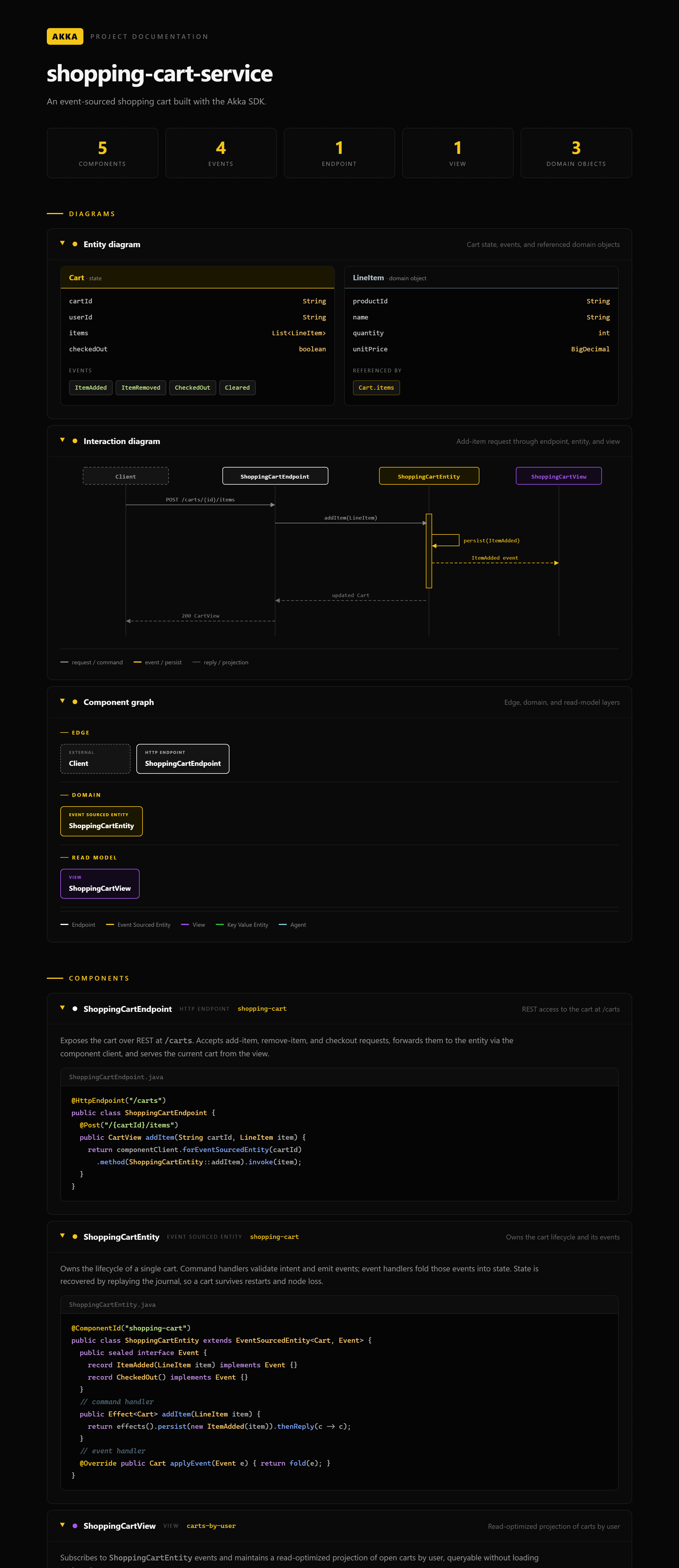
docs/index.html for a sample shopping-cart serviceContent-governance exit conditions
/akka:docs is paired with three exit conditions that verify the generated documentation. See Exit condition states for the state model and Ship tiers for the tier defaults noted below.
| Condition | What it checks | Default tier | How it resolves |
|---|---|---|---|
|
A Vale prose linter over |
|
|
Completeness |
Every documentable thing (active exit condition, à-la-carte command, detected public endpoint) has a page under |
|
|
|
A decomposed adversarial rubric the assistant applies to the generated prose. The rubric asks whether the prose is declarative, whether it states facts rather than flourishes, whether it reads as machine-written. |
|
|