
Routing requests to models
Routing decides which model provider serves a request. Fixed URLs and configurable settings are enough for samples and demos. Production needs performance guarantees, and a choice of provider made from declared rules or from the meaning of the request.
Akka’s AI Gateway Router is an add-on service that makes those decisions. It is not a proxy. A proxy consults it, and it answers with a destination.
How a request reaches a decision
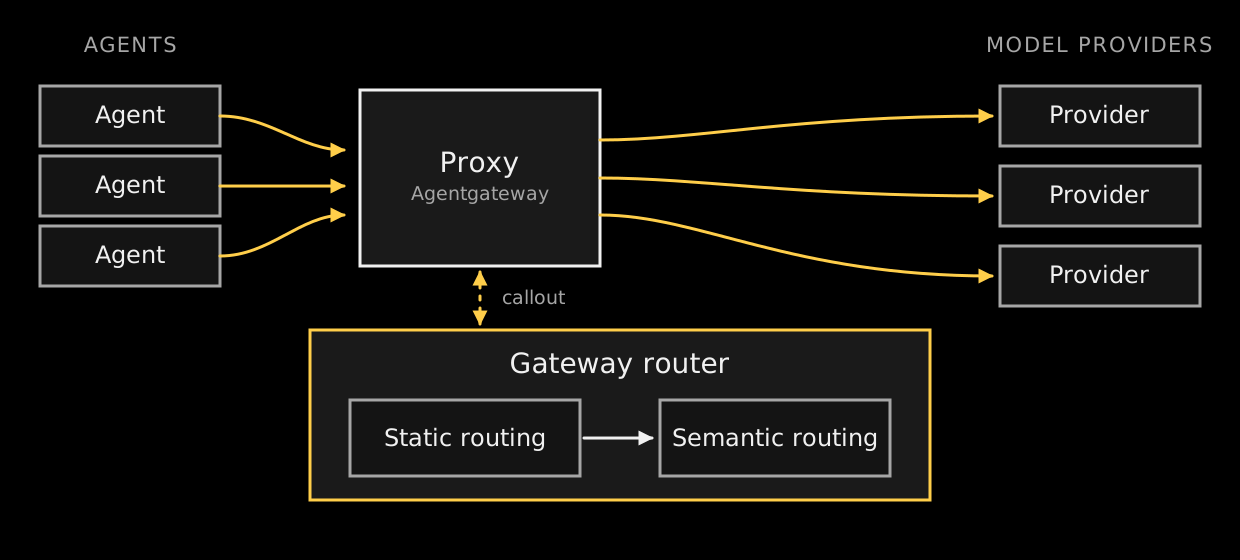
Agents send their model requests to a proxy, such as Agentgateway. The proxy calls the gateway router over gRPC. The router runs the exchange through a pipeline of two stages and returns a destination, and the proxy forwards the request to the model provider named in that decision.
An agent does not address the router and does not name a model. Putting the proxy in the request path is what applies routing to every request, so the set of providers behind it can change without a change to agent code.
The router decides about agentic traffic, such as LLM and MCP calls. It is not a general purpose proxy.
The two stages
Routing on request attributes runs first. It matches declared rules against named attributes of the request, such as the protocol, the model asked for, or a header.
Routing on request meaning runs second, and only for requests the first stage did not claim. It matches the request against use cases discovered from live traffic, using what the request means rather than a declared rule.
Choose the first stage when the condition can be written down: a tenant header, a protocol, a model name. Choose the second when it cannot, because the thing that decides is what the user is asking for.
Destinations
A destination is a backend registered with the gateway proxy. Providers behind one gateway carry different characteristics: a general-purpose model offers broad capability at a higher cost per token, and a smaller model returns faster answers to simpler requests. A model you run yourself, described in Serving models, is one destination a route can name. To train a model for a task of your own, see Training.
Routing on request attributes
Attribute routing chooses a destination by matching declared rules against named attributes of a request. Each rule states a condition, and the condition names an attribute and applies a predicate to it.
No model is consulted, unless a rule defers its decision to a classifier. This is the first of the two stages described in The two stages, and a request it claims never reaches the second.
Writing a rule
A condition names an attribute and states one predicate against it, written flat in a single object:
{ "attribute": "text.prompt", "contains": "task:commit" }Conditions combine with all, any, and not. A rule states the boolean structure rather than leaving it to be inferred from field order, so what a rule means does not depend on how it was written down:
{
  "id": "commit-message",
  "priority": 100,
  "match": {
    "all": [
      { "attribute": "protocol", "equals": "openai.chat" },
      { "attribute": "text.prompt", "contains": "task:commit" }
    ]
  },
  "outcome": { "toDestination": "finetune" }
}
Six predicates are available, and the set is closed. There is no regular expression predicate, because predicates run against prompt text a caller can influence and a regular expression failure would be a way to deny service to the gateway.
String comparisons are case sensitive. A rule testing subject against GPT-4 does not match a request carrying gpt-4. Header names are lower-cased when the attribute is populated, so header.x-tenant matches and header.X-Tenant never does.
See Predicates for all six, and Attributes for everything a rule can match on.
Grouping rules into a ruleset
A ruleset is a named group of rules and the unit that is enforced. Individual rules are not applied to traffic on their own.
A ruleset declares the closed set of destinations its rules may emit, and the destination for traffic no rule claims:
{
  "defaultDestination": "frontier",
  "outputHeader": "x-optimize-route",
  "reasonHeader": "x-optimize-reason",
  "destinations": [
    { "label": "finetune", "description": "the fine-tuned model" },
    { "label": "frontier", "description": "the frontier model" }
  ],
  "rules": [
    {
      "id": "commit-message",
      "priority": 100,
      "match": {
        "any": [
          { "attribute": "text.prompt", "contains": "task:commit" }
        ]
      },
      "outcome": { "toDestination": "finetune" }
    }
  ]
}
Every outcome, including the default, has to name a declared destination. See Routing ruleset for the full document.
Applying a ruleset
akka optimize rulesets apply commit-routing -f ruleset.jsonTo write only while the ruleset is still at the revision you read, so the write fails if another author changed it in the meantime:
akka optimize rulesets apply commit-routing -f ruleset.json --if-revision 3To read what is currently applied:
akka optimize rulesets get commit-routingTo list every ruleset with its revision and priority:
akka optimize rulesets listTesting a ruleset before it sees traffic
To see what a ruleset decides for a sample request, with no traffic involved:
akka optimize rulesets test commit-routing -f request.jsonRun this after every change. A rule that matches nothing is not an error, and the ruleset applies successfully either way.
Changing one rule
To add or replace a single rule without sending the rest of the ruleset:
akka optimize rulesets rules apply commit-routing commit-message -f rule.jsonTo remove one:
akka optimize rulesets rules delete commit-routing commit-messageSetting the order rules are evaluated in
Rules are evaluated by priority, lower first, with id breaking ties. The ordering is total, so the order you read is the order that is used.
Rulesets are evaluated in priority order too. That priority is set through the CLI rather than in the document, so reordering rulesets does not read as a change of policy:
akka optimize rulesets priority commit-routing --set 10akka optimize rulesets priority commit-routingReading what changed
To list every change made to a ruleset, with its revision and who made it:
akka optimize rulesets history commit-routingRetiring a ruleset does not remove that record:
akka optimize rulesets delete commit-routingDeferring a decision to a classifier
A byClassifier outcome hands the decision to a model. This is the one case where attribute routing consults an LLM, and it is the way to handle a condition that cannot be written as a predicate.
Register the classifier first. Registration is immutable, so a retrained model is registered under a new id:
akka optimize routing-classifiers apply commit-router-v4 -f classifier.jsonThen write a rule that defers to it:
{
  "id": "tenant-commit-routing",
  "priority": 100,
  "match": {
    "all": [
      { "attribute": "protocol", "equals": "openai.chat" },
      { "attribute": "header.x-tenant", "exists": true }
    ]
  },
  "outcome": {
    "byClassifier": {
      "classifier": "commit-router-v4",
      "input": "text.lastUserMessage",
      "destinations": { "slm": "finetune", "big": "frontier" },
      "onFailure": "default",
      "affinity": "conversation"
    }
  }
}
The two sides of destinations come from different places. slm and big are answers the classifier itself returns, and they belong to its own vocabulary. finetune and frontier name backends registered with the gateway proxy, and each has to be declared in the ruleset’s destinations list.
affinity: conversation lets the first turn of a conversation decide and later turns reuse that decision. none, which is also what an omitted field means, decides on every turn.
Retiring a classifier is unconditional. Nothing checks whether a rule still names it, so change any rule that selects it first:
akka optimize routing-classifiers delete commit-router-v4Tagging traffic
A tagging ruleset classifies traffic instead of routing it. It is a ruleset of kind tag. The name that you apply it under is the tag key, and its declared destinations are the values that the key can take. The capture of each exchange records the tag, and you can divide spend by it.
akka optimize rulesets apply team -f team.jsonYou write, apply, test and version a tagging ruleset as you do a routing ruleset, with the same match blocks and attributes. A tagging ruleset states no output header and no reason header, and no rule of it may deny a request. See A ruleset that tags traffic for an example document. Keep kind in the document each time that you apply it. The service accepts a document without kind as a routing ruleset, and then records no tag for it.
All rulesets of an exchange share one classifier deadline. A tagging ruleset that defers to a classifier spends part of it, and a routing ruleset that runs after it can have nothing left. A ruleset that reads only headers runs when the headers arrive, and a ruleset that reads the body runs when the body ends. Within each of these two points, rulesets run lowest priority number first, and a ruleset with no priority set runs at 1000. To run a tagging ruleset that defers after the routing rulesets, give it a higher priority number than all of them, for example with akka optimize rulesets priority team --set 2000. A tagging ruleset that reads only headers still runs before a routing ruleset that reads the body, whatever their priorities. A byAttribute outcome avoids the question, because it maps an attribute and consults no classifier.
To read spend by tag, see Divide spend by a tag.
Shifting traffic gradually
A canary outcome sends a share of the conversations a rule matches to a candidate destination and the rest to a baseline destination. The candidate and the baseline are the two arms of the canary.
Start a canary by writing a rule with a low candidatePercent. trial.json holds the rule:
{
  "priority": 200,
  "match": { "attribute": "protocol", "equals": "openai.chat" },
  "outcome": { "canary": { "baseline": "frontier", "candidate": "finetune", "candidatePercent": 1 } }
}
akka optimize rulesets rules apply commit-routing trial -f trial.jsonbaseline and candidate are destinations the ruleset declares, and not the same one. candidatePercent is from 0 to 100 with up to two decimals. See canary for the fields.
candidatePercent is a share of conversations, not of requests or of spend, so a long conversation weighs more than a short one. Every request of one conversation takes the same arm while the rule is unchanged. By default, an Akka agent names its conversation with the x-akka-flow-id header, as Identity headers describes. A caller that is not an Akka service can send the same header.
Raise or lower the share by writing the rule again with a new candidatePercent. Raising it only moves conversations from the baseline to the candidate, and lowering it only moves them back. Each write is a new revision of the ruleset, and it takes effect on every instance once the listing of rulesets has caught up and the instance has read it.
End the canary by writing the rule as toDestination to the candidate or the baseline, or by removing it:
akka optimize rulesets rules delete commit-routing trialTo keep a segment, such as one region, on the baseline, write a toDestination rule that is evaluated before the canary. See Setting the order rules are evaluated in.
A canary rule reads conversation, so its ruleset waits for the request body. A body over 8 MiB, or one that does not parse, then stops that ruleset from deciding, so the rules evaluated before the canary and the ruleset default do not apply either.
A dry run decides the arm from the conversation attribute of the request file, as live traffic does. Without one, each run of akka optimize rulesets test is a new draw. State the value under attributes:
{ "attributes": { "protocol": "openai.chat", "conversation": "order-4471" } }Every exchange records the ruleset, its revision, the rule and the arm. Pass --by route to akka optimize spend get to read the spend of each arm at each revision. See Divide the period.
Routing on request meaning
Semantic routing selects a destination from what a request means. The meaning of a request is derived when it arrives and matched against a list of known use cases, each mapped to a backend.
Meaning is determined by vector arithmetic, not by a model, so it costs no tokens. This is different from a classifier, which does call a model.
This is the second of the two stages described in The two stages. It runs only for requests that attribute routing did not claim.
Where routing on meaning belongs
Some language SDKs and agent frameworks offer semantic routing in application code or in configuration. Sending all agentic traffic through an AI gateway is the way to apply one set of routing rules to every request and to prove afterwards that it was applied.
Architecture
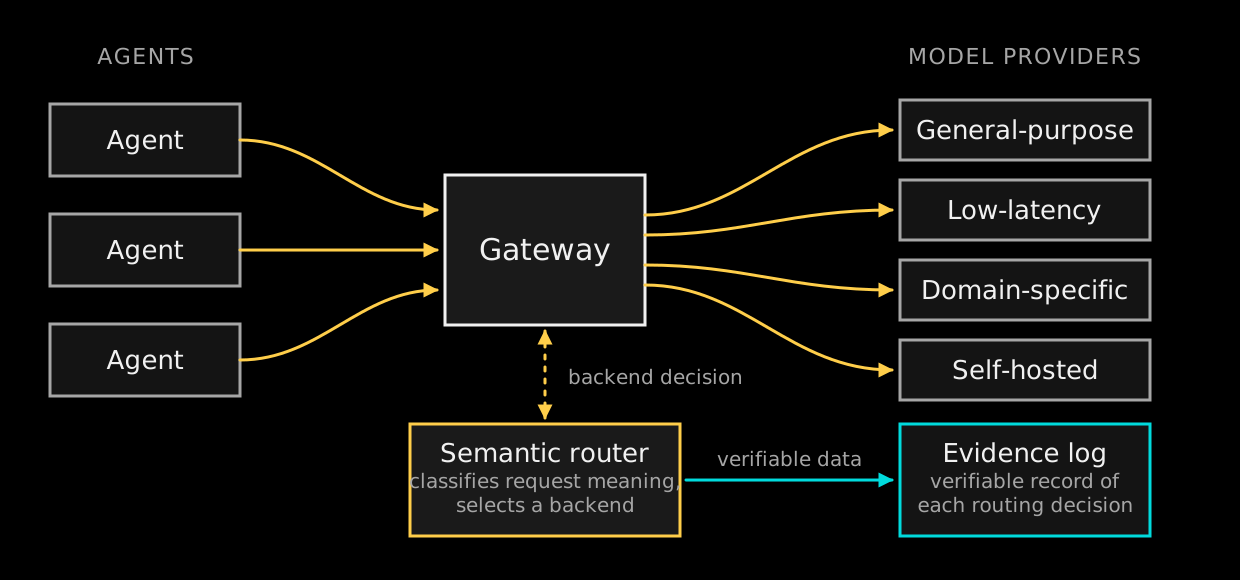
Agents cannot know they are going through a gateway. As with an HTTP proxy, the infrastructure directs traffic to it and application code never makes that decision.
The gateway passes each request to the semantic router. The router examines the content, returns the backend that should serve it, and the gateway forwards the request to that model provider.
The router streams a verifiable record of each decision to an evidence log. Each record covers one routing decision, so the backend chosen for a past request can be checked afterwards: what was decided, when, from which context, for which input, and against which hashed version of the routing rules. The evidence chain is cryptographically unforgeable, which is what lets a decision withstand governance and compliance scrutiny.
Because the router derives its decision from the request rather than from a model name the caller supplied, the set of providers behind the gateway can change without a change to agent code.
Defining use cases
A use case is a class of request that the semantic router recognizes. The router compares the identified use case from the request against its list of known use cases and routes accordingly, as covered in Working sets and manifests.
Before any of this routing can take place, the use cases need to be clearly defined.
Learning use case clusters
Each time a request is seen by the semantic router, it identifies in which use case that request belongs. It does this by creating an embedding from the request and comparing that embedding against the centers of previously discovered use cases. No LLM is used to detect clusters. The comparison is vector arithmetic, so it incurs no token cost.
If a request is seen that identifies its own new use case (it is far away from any of the existing centers of use case groups), then the use case boundaries are re-evaluated. To keep clustering fast, the gateway router does not assign or infer labels for use cases. Humans look at the exemplars of a given use case and use those to decide on labels.
Example use cases for an online store
Take a look at the following list of representative prompt inputs from users of an online store application. The store has five identified use cases and the router matches each incoming request to only one of them.
| Prompt | Use case |
|---|---|
"Add two of the blue running shoes in size 10 to my basket." |
Cart |
"Take the phone charger back out of what I am buying." |
Cart |
"How much does everything I have picked out come to?" |
Cart |
"What did I buy in March?" |
Orders |
"Cancel the order I placed yesterday morning." |
Orders |
"I need to return the jacket from order 4471." |
Orders |
"I was charged twice and nobody has answered my email." |
Customer service |
"This is the third time an item has arrived damaged." |
Customer service |
"I want to speak to a person about my account being locked." |
Customer service |
"Does this jacket run small?" |
Product query |
"What is the difference between the Pro model and the Max model?" |
Product query |
"Will this mount fit a 2019 frame?" |
Product query |
"Where is my package?" |
Shipping check |
"Will this arrive before Friday?" |
Shipping check |
"Tracking says delivered but nothing came." |
Shipping check |
The match is on meaning, so requests that share no keywords can still reach the same use case. "What did I buy in March?" and "Cancel the order I placed yesterday morning." have no words in common, yet both map to the orders use case. Remember that this label is only useful for humans. The router does not know what "orders" means beyond it being a label humans have supplied to one of its identified use case clusters.
If a request can potentially belong to multiple categories ("Will this arrive before Friday and are there any more in stock?"), use an autonomous or orchestrator agent to answer them as two separate questions against different models.
Use cases vs tools
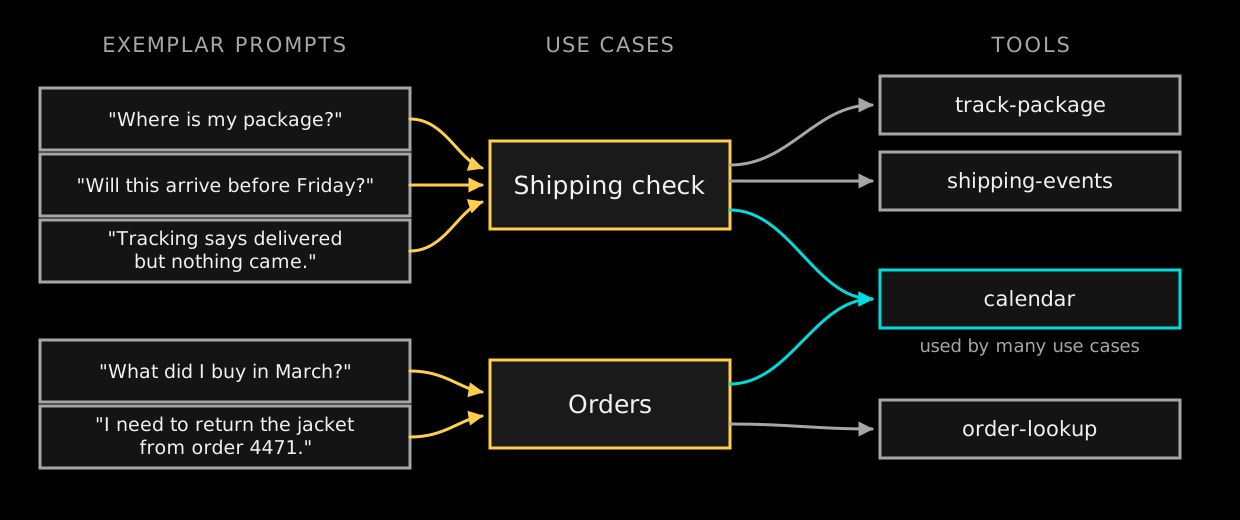
At first glance, tools and use cases might seem similar since both require some kind of meaning to be derived from the incoming request. Use cases are a much broader scope than tools, and a tool can be used within multiple use cases.
Consider the shipping check use case. Given the exemplars in this use case, you might expect the following tools to be used:
-
calendar- Figure out what "Friday" means -
track-package- Figure out when a shipped package is due to arrive -
shipping-events- Diagnostic list of events in the package’s shipping lifetime.
Here track-package and shipping-events are tools that clearly belong within the use case of shipping check. However, the calendar tool is far more general purpose and the majority of prompts in many use cases are likely to use this tool ("I last complained about my order on Monday").
Prompts, use cases, and tools all exist at different levels of the hierarchy. Exemplar prompts are individual requests, a use case is the cluster they fall into, and a tool is a capability that one or more prompts within use cases draw on.
Getting from traffic to a routing policy
Discovery runs continuously against live traffic. Turning what it finds into enforced routing is four steps.
1. Read the working set
The working set is what has been discovered so far, and it keeps changing as traffic arrives.
akka optimize use-cases working-setTo see whether the working set is stable enough to fix:
akka optimize use-cases status2. Label what was discovered
The router does not name the clusters it finds. Read the requests nearest the center of a cluster and decide what to call it:
akka optimize use-cases exemplars list 7akka optimize use-cases label 7 ordersSee Defining use cases for what a use case is and how one is discovered.
3. Freeze the working set as a manifest
Once every use case above the relevance threshold has a label, fix the set and give each label a backend:
akka optimize use-cases freeze --as 2026-08 --backend orders=frontier --backend cart=finetuneA manifest is immutable, versioned, and provenance-verifiable. To compare one against the working set as it now stands:
akka optimize use-cases manifests diff 2026-084. Deploy the manifest
Only one manifest is live at a time:
akka optimize use-cases manifests deploy 2026-08See Working sets and manifests for what a manifest holds and how a use case reaches a backend.
Working sets and manifests
Routing connects a use case to the backend that serves it. After the semantic router matches a request to a use case, as described in Defining use cases, the routing rules for that use case decide which model provider receives the request.
The gateway router observes incoming traffic continuously, produces embeddings, and groups requests into discovered use cases. This set of use cases and their rankings keeps changing as traffic arrives, and it is called the working set.
The router reports which use cases are stable and which are still moving. Once every use case above the relevance threshold carries a label, you take a snapshot of the working set and give each use case a backend name.
That snapshot is a use case manifest. It is immutable, versioned, and provenance-verifiable. The backend names an operator supplies correspond to the gateway proxy configuration, so the manifest is a route table keyed on the meaning of a request.
Only one manifest enforces routing at a time.
Inspecting a manifest
To list every manifest and whether it is able to enforce:
akka optimize use-cases manifests listTo read one as it was frozen:
akka optimize use-cases manifests get 2026-08A manifest is fixed and the working set is not, so the two separate over time. To see how far apart they have moved:
akka optimize use-cases manifests diff 2026-08A large difference means traffic has changed shape since the manifest was frozen, and that some current traffic is being routed by a table that no longer describes it.
Replacing the live manifest
Deploying a manifest makes it the routing policy and displaces the one before it:
akka optimize use-cases manifests deploy 2026-09To withdraw a manifest from use:
akka optimize use-cases manifests delete 2026-08Getting from traffic to a routing policy covers the steps that produce a manifest.
| The features described in this section are an add-on to Akka Automated Operations. They are not included in the base product. |