
Defining use cases
A use case is a class of request that the semantic router recognizes. The router compares the identified use case from the request against its list of known use cases and routes accordingly, as covered in Routing use cases.
Before any of this routing can take place, the use cases need to be clearly defined.
Learning use case clusters
Each time a request is seen by the semantic router, it identifies in which use case that request belongs. It does this by creating an embedding from the request and comparing that embedding against the centers of previously discovered use cases. No LLM is used to detect clusters. The comparison is vector arithmetic, so it incurs no token cost.
If a request is seen that identifies its own new use case (it is far away from any of the existing centers of use case groups), then the use case boundaries are re-evaluated. To keep clustering fast, the gateway router does not assign or infer labels for use cases. Humans look at the exemplars of a given use case and use those to decide on labels.
Example use cases for an online store
Take a look at the following list of representative prompt inputs from users of an online store application. The store has five identified use cases and the router matches each incoming request to only one of them.
| Prompt | Use case |
|---|---|
"Add two of the blue running shoes in size 10 to my basket." |
Cart |
"Take the phone charger back out of what I am buying." |
Cart |
"How much does everything I have picked out come to?" |
Cart |
"What did I buy in March?" |
Orders |
"Cancel the order I placed yesterday morning." |
Orders |
"I need to return the jacket from order 4471." |
Orders |
"I was charged twice and nobody has answered my email." |
Customer service |
"This is the third time an item has arrived damaged." |
Customer service |
"I want to speak to a person about my account being locked." |
Customer service |
"Does this jacket run small?" |
Product query |
"What is the difference between the Pro model and the Max model?" |
Product query |
"Will this mount fit a 2019 frame?" |
Product query |
"Where is my package?" |
Shipping check |
"Will this arrive before Friday?" |
Shipping check |
"Tracking says delivered but nothing came." |
Shipping check |
The match is on meaning, so requests that share no keywords can still reach the same use case. "What did I buy in March?" and "Cancel the order I placed yesterday morning." have no words in common, yet both map to the orders use case. Remember that this label is only useful for humans. The router does not know what "orders" means beyond it being a label humans have supplied to one of its identified use case clusters.
If a request can potentially belong to multiple categories ("Will this arrive before Friday and are there any more in stock?"), use an autonomous or orchestrator agent to answer them as two separate questions against different models.
Use cases vs tools
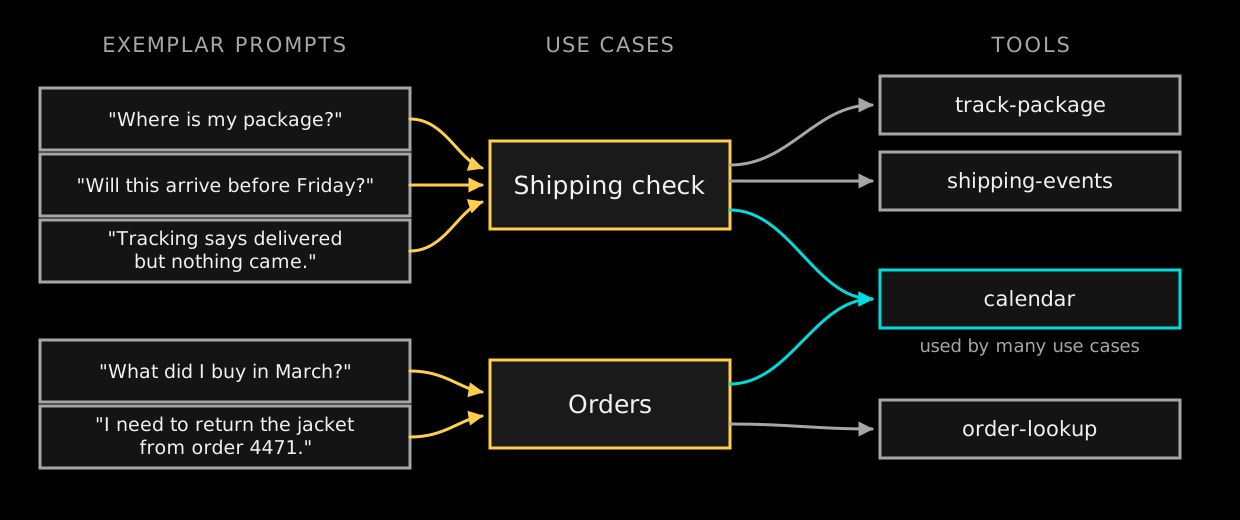
At first glance, tools and use cases might seem similar since both require some kind of meaning to be derived from the incoming request. Use cases are a much broader scope than tools, and a tool can be used within multiple use cases.
Consider the shipping check use case. Given the exemplars in this use case, you might expect the following tools to be used:
-
calendar- Figure out what "Friday" means -
track-package- Figure out when a shipped package is due to arrive -
shipping-events- Diagnostic list of events in the package’s shipping lifetime.
Here track-package and shipping-events are tools that clearly belong within the use case of shipping check. However, the calendar tool is far more general purpose and the majority of prompts in many use cases are likely to use this tool ("I last complained about my order on Monday").
Prompts, use cases, and tools all exist at different levels of the hierarchy. Exemplar prompts are individual requests, a use case is the cluster they fall into, and a tool is a capability that one or more prompts within use cases draw on.
|
The features described in this section are an add-on to Akka Automated Operations. They are not included in the base product. |